
Utilizing Angular's provideAppInitializer to load a module federation remote during application initialization

TLDR:
In a micro-frontend setup with Angular and module federation, we can intercept Angular's bootstraping process to execute code from a remote application before the host application fully initializes using provideAppInitializer.
Problem Context
Our team works on a micro-frontend Angular application that sits across multiple environments that includes testing, staging and production environments. These environments all have different environment variables such as api endpoints, cdn urls, e.t.c.
We utilize NX for our micro-frontend setup which makes the setup easier to manage. The NX docs provides very good documentation on getting started with NX, Angular and Module Federation.
During a deployment of our microfrontend to each of the environments, the pipeline swaps out the values in the compiled environment.ts file with the appropriate values for each of these environments.
The microfrontend (in our case called remote-app) exposes two remotes in the module-federation.config.ts file:
remoteRoutes- routes that configure the child routing logicenvironment- the environment file that contains environment variables
const moduleFederationConfig: ModuleFederationConfig = {
name: 'remote-app',
exposes: {
'./remoteRoutes': 'apps/remote-app/src/app/routes.ts',
'./environment': 'apps/remote-app/src/environments/environment.ts',
},
};These remotes can then be fetched from the host application by using the loadRemote module federation function from @module-federation/enhanced/runtime. i.e.:
bootstrapApplication(AppComponent, {
providers: [
provideRouter([
{ path: '', component: HomeComponent },
/* This loads the remote routes to the applications router such that going to /remoteUrl loads the routes from the microfrontend */
{ path: 'remoteUrl', loadChildren: () => loadRemote('remote-app/remoteRoutes').then(m => m.remoteRoutes)}
]),
// other providers...
]
})The set up would look like this figuratively:
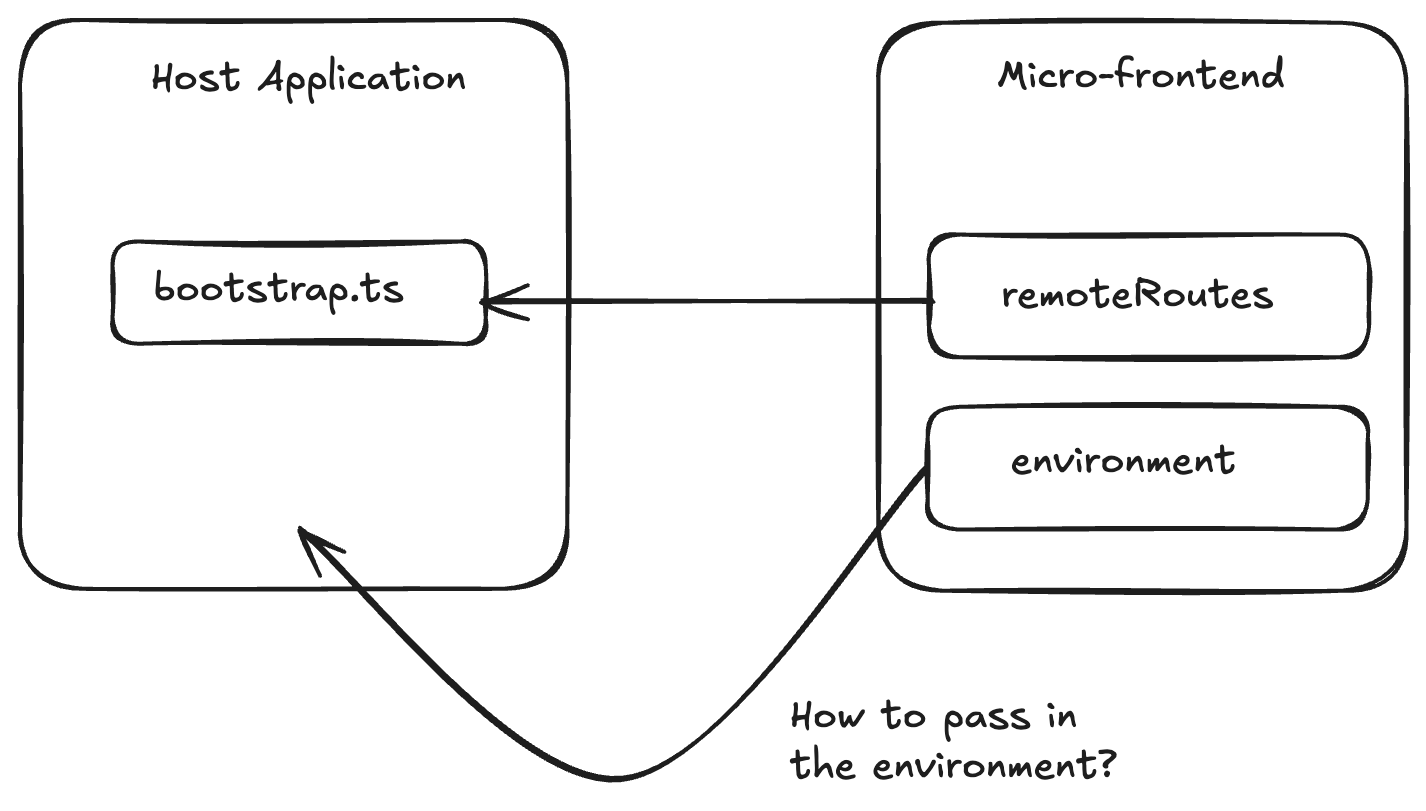
This environment file contains mostly environment variables specific to each environment. These values need to be available at run time.
An example of an environment file would be:
export const environment = {
apiUrl: 'https://api-dev.our-app.com/v1.0/',
cdnUrl: 'https://cdn-dev.our-app.com/',
appInsightsUrl: 'https://app-insights-dev.our-app.com/',
} as constUtilizing provideAppInitializer
Angular provides a way to run async during the boostraping phase through the provideAppInitializer that is provided at the application startup phase.
If an async process is to be run, we can pass this function to be executed in the bootstrap phase and angular will not complete initialization until this async logic completes - an observable completes or a promise resolve.
We would first need to modify how we pass in our environment variables and load them into a service. As well, we would need to define a function to run in the provideAppInitializer callback. For our example, we will name our function initialize() (but you can choose to call your function something different such as init or setup):
@Injectable({providedIn: 'root'})
export class AppEnvService {
apiUrl: string = '';
appInsightsUrl: string = '';
cdnUrl: string = '';
initialize(): Promise<AppEnvService | null> {
return loadRemote<typeof import('remote-app/environment')>('remote-app/environment')
.then(({environment}) => {
this.apiUrl = environment.apiUrl;
this.appInsightsUrl = envenvironment.appInsightsUrl;
this.cdnUrl = envenvironment.cdnUrl;
return this;
})
.catch((error) => {
console.error('Failed to load remote application/environment configuration', error?.message || error);
return null;
});
}
}Notice here that our environment service contains a function that returns a promise.
This is the function that we would pass into the provideAppInitializer function:
In the bootstrap.ts file for our host application, we can then initialize our AppEnvService to set up environment variables:
bootstrapApplication(AppComponent, {
providers: [
// Inject the AppEnvironment and call the initialize function
provideAppInitializer(() => inject(AppEnvService).initialize()),
provideRouter([
{ path: '', component: HomeComponent },
{ path: 'remoteUrl', loadChildren: () => loadRemote('remote-app/remoteRoutes').then(m => m.routes)}
]),
// other providers...
]
})During the application startup phase, Angular will run this async AppEnvService.initialize() function, fetch our environment variables and populate them into our AppEnvService.
Epilogue
The main reason for implementing module federation was because two teams working on various parts of the application wanted to deploy independently. This is not what micro-frontends were designed for as our micro-frontend does not operate independently.
I do wonder what the loadRemote function does specifically under the hood to fetch and load the remote routes, and provides the same angular context as the host application.
Something to investigate further!